How to Set Up URL Redirects (301 and 302) in Pixelesq

When You Actually Need Redirects
Redirects solve one problem: old URLs pointing to content that has moved. Common scenarios:
URL structure change: you moved
/about-usto/company/aboutand want old bookmarks and backlinks to keep working.Page deletion: you deleted
/old-productbut it still has inbound traffic from old links or search results.Domain migration: you moved from an old site to Pixelesq and need to map old URL patterns to new ones.
Short links: you want
/demoto redirect to a longer Calendly or Cal.com URL.Forcing canonicalization: redirecting trailing slash versions, case variants, or www to a canonical URL.
If you just want to change a page's slug, use the page settings directly. Redirects are only needed when old URLs exist and you need to preserve traffic from them.
301 vs 302 vs 307 vs 308: Pick the Right Status Code
Pixelesq supports all four HTTP redirect status codes. They behave differently:
CodeTypeWhen to Use301PermanentContent has moved forever. Search engines transfer SEO value from the old URL to the new one. Browsers cache aggressively. Default choice for most migrations.302TemporaryContent is temporarily at a different URL but will come back. Search engines do not transfer SEO value. Use for A/B tests, maintenance pages, or promotions.307Temporary (Preserve Method)Same as 302, but forces the browser to re-send POST requests as POST. Used for APIs or forms that should not be converted to GET on redirect.308Permanent (Preserve Method)Same as 301, but preserves the HTTP method. Rarely needed for website redirects. More common in API contexts.
For 95% of site redirects, use 301. Use 302 only when the redirect is genuinely temporary.
Step 1: Open the Redirects Tab
In your Pixelesq dashboard, click Settings in the sidebar, then select the Redirects tab.
You will see a table of existing redirects, or an empty state if you have not created any. Each row shows the source path, destination, status code, match type, priority, author, and last updated time.
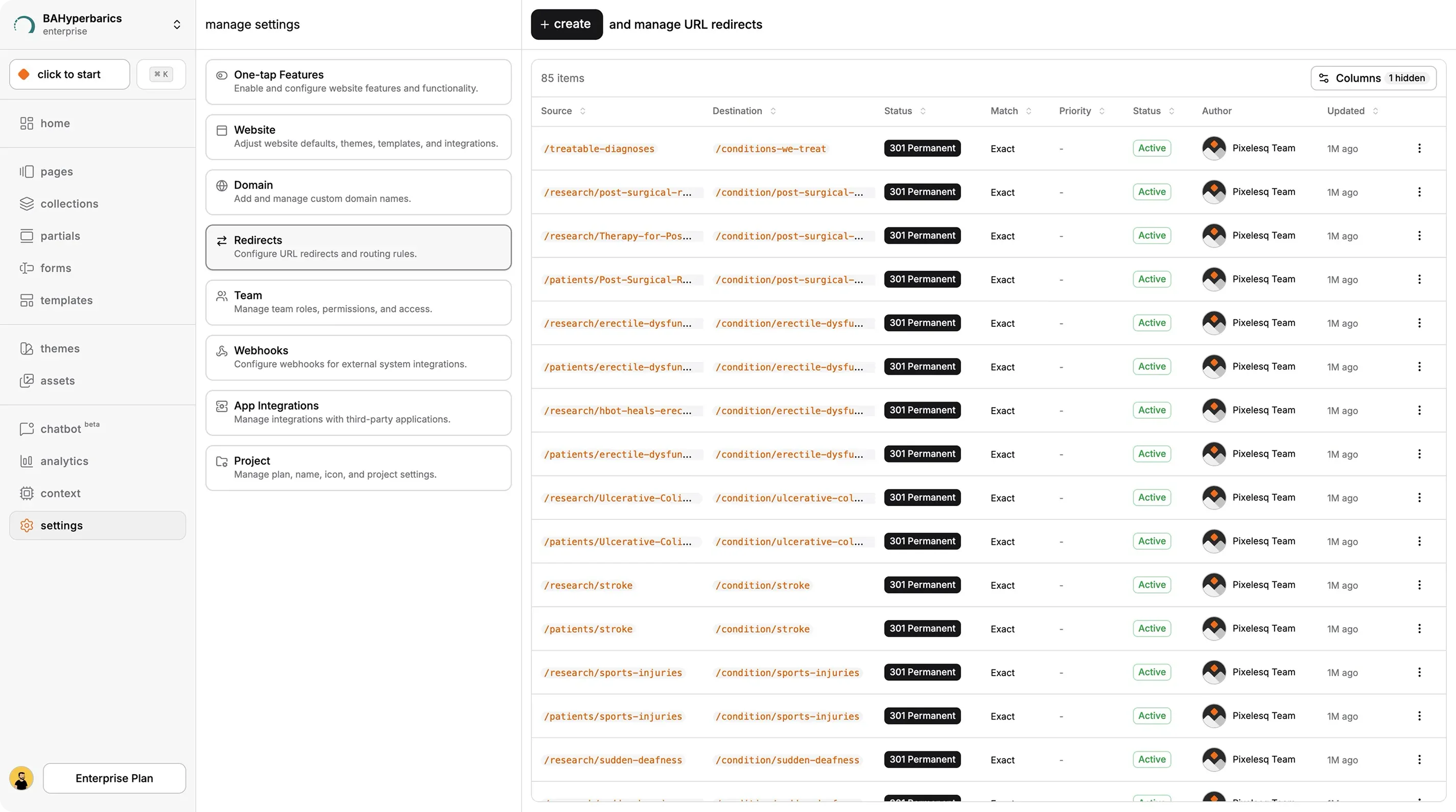
Step 2: Click Create
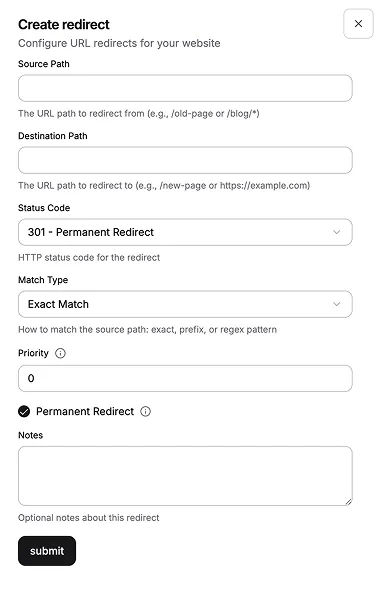
Click the + create button at the top right. A dialog titled "Create redirect" opens with these fields:
Source Path - the URL to match (e.g.,
/old-page)Destination Path - where to redirect to (e.g.,
/new-pageorhttps://external.com/page)Status Code - 301, 302, 307, or 308
Match Type - exact, prefix, or regex
Priority - number from 0 to 100, higher processes first
Permanent - checkbox (usually set automatically based on status code)
Notes - optional description for your reference
The Three Match Types Explained
Exact Match
The source path must match exactly. Use for single-URL redirects.
Example:
Source:
/old-pricingDestination:
/pricingMatch Type: exact
Only /old-pricing redirects. /old-pricing/team or /old-pricing?utm=abc do not match.
Prefix Match
The source path matches any URL starting with the source. The remainder is appended to the destination. Use for bulk redirects when you move a whole section.
Example:
Source:
/blog/2023Destination:
/archive/2023Match Type: prefix
Now /blog/2023/my-post redirects to /archive/2023/my-post. The rest of the path is preserved.
This is the most powerful redirect type for migrations. Moving a whole blog section, product category, or documentation area? Prefix match lets you do it in one rule instead of hundreds.
Regex Match
The source path is a regular expression. Use capture groups with $1, $2, etc. in the destination. Use for complex patterns that prefix matching cannot handle.
Example:
Source:
^/user/(\d+)$Destination:
/profile/$1Match Type: regex
Now /user/123 redirects to /profile/123, and /user/456 redirects to /profile/456. The captured number passes through to the destination.
Regex is powerful but easy to misuse. Test carefully. A broken regex pattern silently fails to match, so you may not notice the redirect is not firing until a visitor hits a broken URL.
Step 3: Set Priority (If You Have Conflicting Rules)
Priority controls the order redirects are evaluated. Higher priority rules are checked first. The first matching rule wins.
Priority matters when one URL could match multiple rules. Example:
Rule A: prefix match on
/blog→/archive(priority 0)Rule B: exact match on
/blog/special-post→/landing-page(priority 10)
Without priorities, the prefix rule could catch /blog/special-post first and redirect it to /archive/special-post instead of /landing-page. By giving Rule B a higher priority (10 > 0), Pixelesq checks it first, and the special case is handled correctly.
Default priority is 0. Leave it at 0 unless you have conflicting rules.
Step 4: Add a Description and Save
Fill in the Notes field with a short description (e.g., "Redirect old blog section after 2024 migration"). Future-you will thank present-you when trying to remember why a redirect exists.
Click the submit button. The redirect is created, the dialog closes, and the list updates. Your new redirect is active immediately, no publishing required.
Redirect to External URLs
Destination paths can be external URLs. Example:
Source:
/demoDestination:
https://cal.com/yourcompany/demo-30minStatus: 302 (temporary, since you might change the booking link)
Visitors to yourbrand.com/demo are sent to your Cal.com booking page. This works for any external URL, not just booking tools. Use it for affiliate links, social profiles, or documentation hosted on another platform.
Disable vs Delete a Redirect
Each redirect row has an actions menu with Edit, Disable, and Delete.
Disable turns the redirect off without removing it. The row shows a red Disabled badge. You can re-enable it later with one click.
Delete permanently removes the redirect. There is a confirmation dialog.
Use Disable when you might need the redirect back, or when you are testing whether it is still needed. Use Delete only when you are sure.
SEO Rules for URL Changes
Redirects are the standard way to preserve SEO when URLs change. Follow these rules:
Always use 301 for permanent moves. 302 does not transfer SEO value. If you are permanently changing a URL, use 301.
Do not chain redirects. If
/aredirects to/b, do not then set/bto redirect to/c. Chains dilute SEO value at each hop. Redirect/adirectly to/c.Update internal links. Redirects should be a safety net, not a replacement for fixing your internal navigation. If a page on your site links to
/old-url, update the link to point to/new-urldirectly.Monitor crawl errors in Google Search Console. After a big redirect migration, check GSC for 404 errors that your redirects missed. Add rules to cover them.
Pro Tips
Use leading slashes for source paths.
/old-pageis unambiguous. Justold-pageresolves relative to the current directory, which behaves differently depending on the URL context. Always start source paths with a forward slash.Prefix matching saves you from writing dozens of rules. If you moved 50 blog posts from
/blogto/articles, one prefix redirect handles all of them. Use it.Disable instead of delete when testing. If you are not sure whether a redirect is still needed, disable it for a week. Watch your 404 logs. If nothing breaks, delete it. If traffic drops or errors appear, re-enable it.
Set priorities for overlapping rules. Any time you have a prefix rule AND a more specific rule inside that prefix, give the specific rule higher priority. Otherwise the prefix rule catches the specific URL first.
Document with notes. "Redirect post-migration from WordPress" is a helpful note. Future-you or your teammate will understand why a weird-looking rule exists.
Troubleshooting
My redirect is not firing: Check the match type first. If you set exact match and the source path has a trailing slash, the visitor URL must also have a trailing slash. Exact match is literal. If in doubt, switch to prefix match for more forgiving matching.
Two redirects match the same URL and the wrong one wins: Adjust priority. The rule with the higher priority is evaluated first and wins. Give your more specific rules higher priorities than broader ones.
Prefix redirect is catching URLs I did not expect: Prefix matching treats /blog as any URL starting with /blog, including /blogging and /blog-archive. Use exact match or adjust the source to /blog/ (with trailing slash) to be more precise.
Regex redirect is silently failing: Regex errors are caught and logged without crashing the site. Check your browser console for warnings. Also test your regex pattern in a tool like regex101.com to confirm it matches what you expect before putting it in Pixelesq.
Redirects are saving but visitors still see the old page: Your browser or ISP is caching the old response. Test in an incognito window or on a different network. For 301 redirects specifically, browsers cache aggressively, so clear your browser cache.
FAQ
Are there any limits on how many redirects I can create?
Pixelesq does not enforce a hard limit on the number of redirects per project. In practice, sites with thousands of redirects may see slightly slower page loads because every incoming URL is checked against the redirect list. For most sites, redirect count is not a concern. If you have thousands of redirects after a migration, consider consolidating with prefix rules.
Can I schedule a redirect to activate at a future date?
Not directly. Redirects are active immediately when created. For scheduled activation, create the redirect in its disabled state, then manually enable it at the scheduled time. Alternatively, use your calendar to remind yourself to create the redirect on the target date.
Do redirects work on the default Pixelesq subdomain, or only custom domains?
Redirects work on both. The redirect engine processes incoming URLs regardless of whether the visitor arrived through your custom domain or your default yourproject.sites.app.pixelesq.ai URL. This lets you test redirects on the default URL before your custom domain is set up.
Can I create a redirect that only fires for specific countries or user agents?
No. Pixelesq's redirects are URL-pattern-based only. They do not support conditional logic based on visitor country, language, device, or user agent. For geo-specific or device-specific redirects, you need a custom solution using JavaScript in Custom Tags or an edge function through a third-party service.
What is the difference between a redirect and a URL rewrite?
A redirect changes the URL in the browser's address bar. The visitor sees the new URL. A URL rewrite serves content from a different URL without changing what the visitor sees. Pixelesq only supports redirects, not rewrites. For most use cases, redirects are what you want. Rewrites are more common in complex CMS setups where URL structure and content structure differ.
If I disable a redirect, does it affect SEO?
Yes. If a redirect was preserving SEO value from an old URL to a new one, disabling it means search engines will eventually see the old URL as a 404. Google may deindex the old URL and you lose any SEO value that was flowing through the redirect. Before disabling a redirect, check if the old URL still has backlinks or search impressions using Google Search Console.
On this page


