Send form submissions and site updates to another app with a webhook
Create a webhook
- In the sidebar, click settings, then Webhooks.
- Click create.
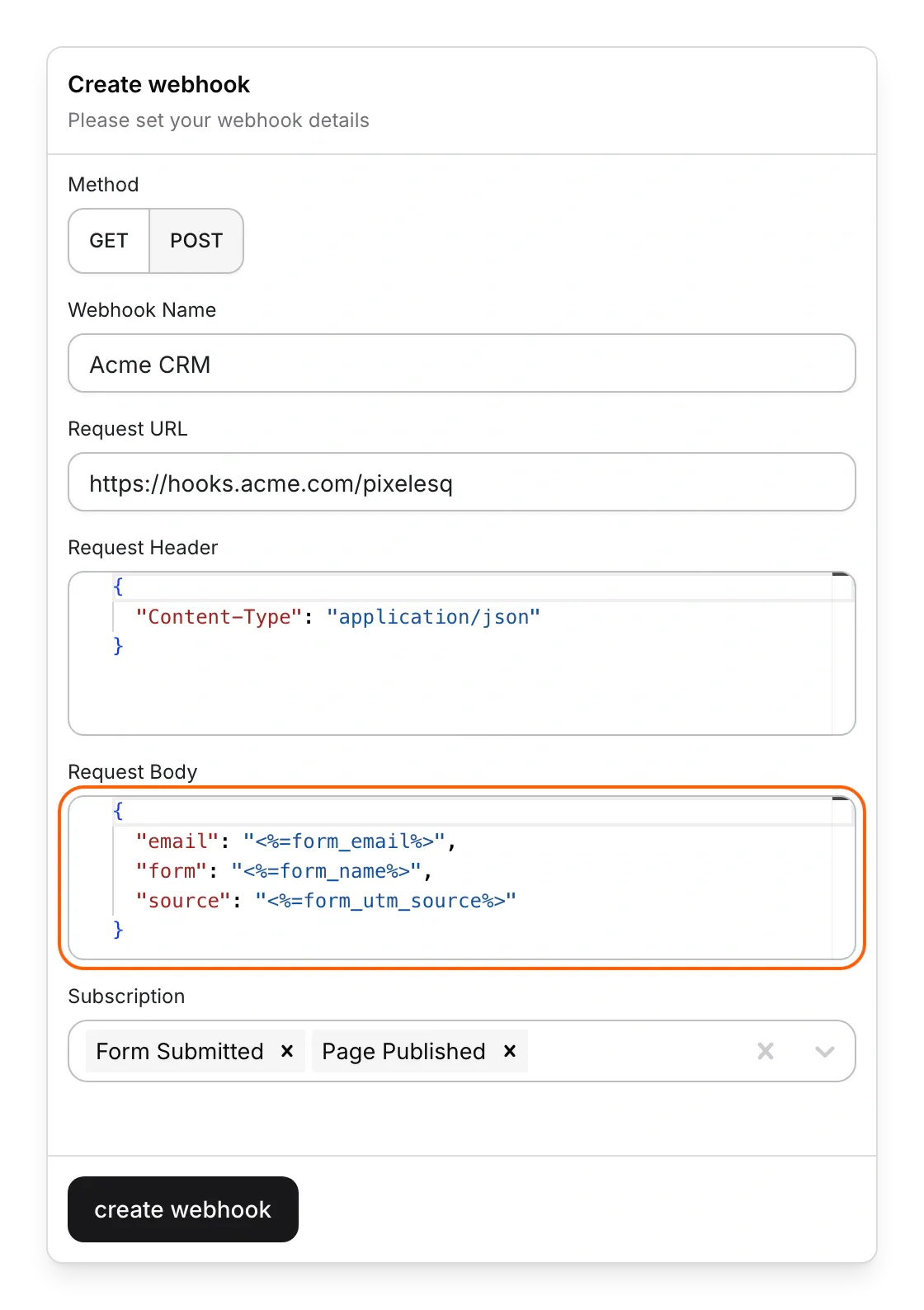
- Pick a Method. GET only calls the URL. POST also sends headers and a JSON body.
- Type a Webhook Name you'll recognize, and paste the other app's address into Request URL.
- For POST, fill in Request Header and Request Body as JSON. Type
{}in a box you don't need. - Under Subscription, pick the events that call the URL.
- Click create webhook.
The webhook shows in the list as Active, and the next matching event calls your URL.
Events you can pick
- Form Submitted: someone sends one of your forms. Leads the chatbot saves to a form count too.
- Page Saved, Page Published, Page Unpublished and Page Deleted: a page's draft is saved, the page goes live, comes off your site or is deleted.
- Entry Saved, Entry Published, Entry Unpublished and Entry Deleted: the same for collection entries, such as blog posts.
Add page, entry and form details
Put a value's name between <%= and %>, and Pixelesq fills it in on each call. Values work in the Request URL and in the values of the header and body. For example, {"email": "<%=form_email%>"} sends the email the visitor typed.
- Every event: project_id and project_name, plus actor_name and actor_email for changes a person made.
- Page events: page_id, page_name and page_slug, the page's address such as /pricing.
- Entry events: entry_id, entry_name, entry_slug, collection_id, collection_name and collection_slug.
- Form Submitted: form_id, form_name and form_submission_id, plus form_ and a field's System name, such as form_email.
- Where the visitor came from: form_utm_source, form_utm_medium, form_utm_campaign, form_utm_term, form_utm_content, form_landing_page, form_submit_page, form_referrer, form_channel, form_from_ad and form_click_id.
- Quizzes: result_title and result_total.
A value that doesn't apply to the event comes through empty. To send fixed text instead, add it after two bars, such as <%=form_name || 'Website'%>.
Pause, edit or delete a webhook
- In settings, under Webhooks, click the three dots at the end of the webhook's row.
- Pick Edit to change it, then click update webhook.
- Pick Pause to stop its calls, or Resume to start them again.
- Pick Delete and confirm to remove it for good.
A paused webhook shows Paused under Status, and calls still waiting to go out are dropped.
Limits
- Values are filled in only at the top level of the header and body. Nested objects and lists don't come through as written, so give each value its own key.
- Every value arrives as text, so numbers and true or false come through in quotes.
- A field's answer wins over a built-in value with the same name. If a form has a field whose System name is name, form_name holds that answer instead of the form's name.
- No value names the event. To tell events apart, use one webhook per event, or add something like ?event=published to each URL.
- Page Deleted and Entry Deleted calls arrive without the page or entry details.
- Submissions marked as spam don't call your webhook.
- Your app has 60 seconds to answer with a success status, such as 200. If it doesn't, Pixelesq tries again up to 4 more times, waiting longer each time.
- Pixelesq doesn't follow redirects and can't call private addresses, such as localhost.
- Pixelesq doesn't keep a log of calls, and there's no test button. To test, trigger a real event, such as sending your own form.
Common questions
What does "Error creating webhook" mean?
A POST webhook needs something in both Request Header and Request Body. Type {} in the empty one and click create webhook again.
What does "Invalid JSON" mean?
The header or body isn't valid JSON. Put double quotes around every key and text value, and a comma between pairs.
Can I send form submissions to Zapier, Make or n8n?
Yes. Start a webhook trigger in that tool, paste its URL into Request URL, and pick Form Submitted. To pass leads on to a CRM, see Send leads to HubSpot or another CRM.
Why did publishing one entry call my webhook twice?
An entry with its own page fires Entry Published and Page Published together. Pick only the one you need.
Why does Page Saved fire so often?
Pages save on their own while you edit, and every save is an event. To hear only about changes that went live, pick Page Published instead.
On this page
Prerequisites
A URL from the other app that accepts webhook calls. Automation tools such as Zapier, Make and n8n give you one.
Still have questions?
Ask Pixel in your dashboard. It can make many changes for you, or take you to the right screen. Our team can also help you plan, build or move your site.


