Send form submissions and site changes to any URL
Send form submissions, page publishes and entry changes to any URL your other tools listen on.
Overview
Webhooks let your Pixelesq site tell your other tools when something happens. Pick an event, such as a form submission or a published page, and Pixelesq sends a request to the URL you choose.
Use them to send leads to a CRM or automation tool that accepts webhooks, post to a chat channel, or tell another system that a page changed.
How it Works
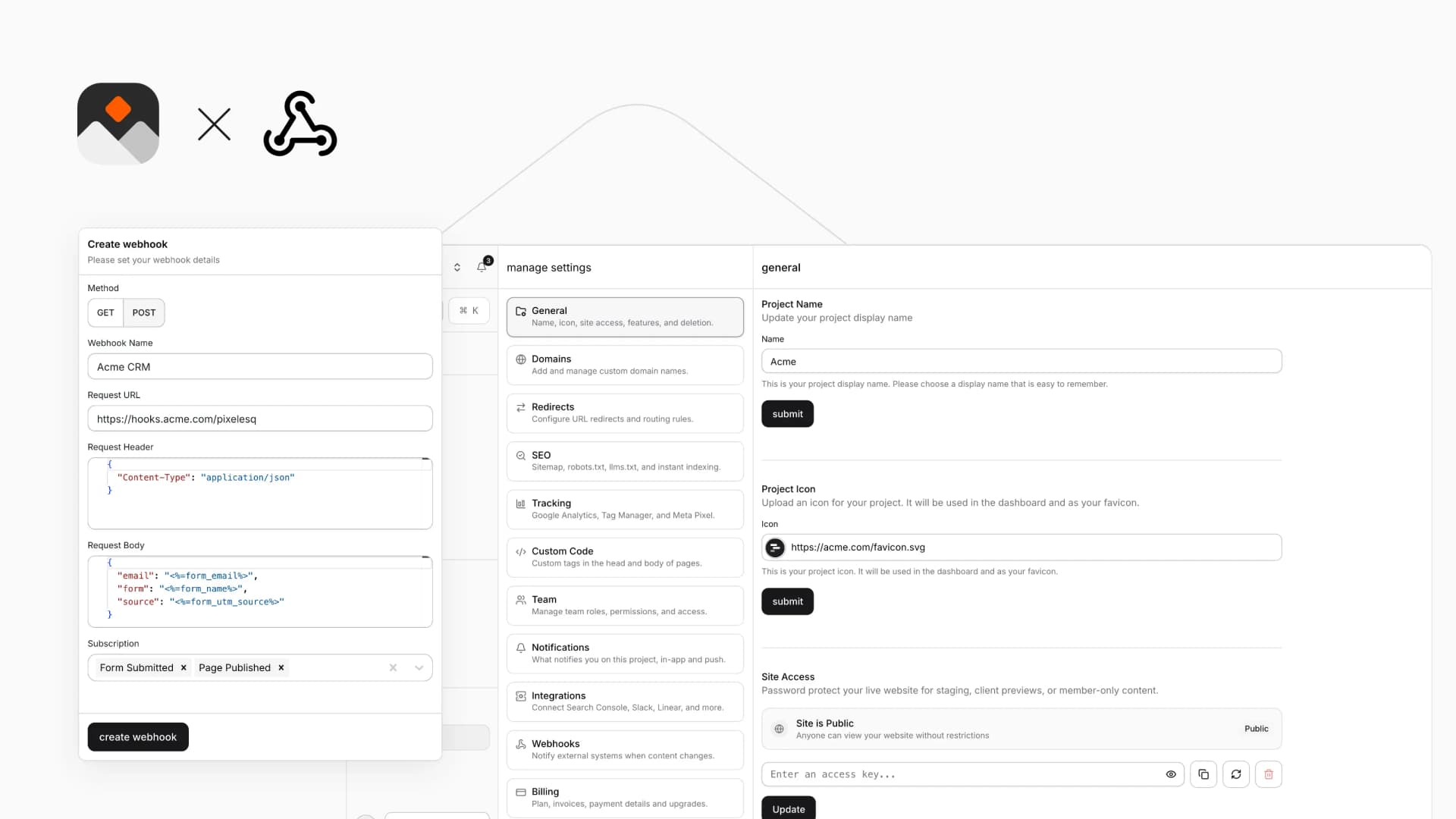
Each webhook has a name, a request URL, a method (POST or GET), and optional JSON headers and body. Put values such as the page slug or a form field in the URL, headers or body, and Pixelesq fills them in when the webhook fires.
A form submission can carry every field, the UTM tags, the landing page and whether the visitor came from an ad. Webhooks fire when pages and entries are saved, published, unpublished or deleted, and when a form is submitted.
Configure
Go to Settings > Webhooks in Pixelesq. Owners and Editors can manage webhooks.
Click create and give the webhook a name
Enter the request URL and choose POST or GET
Add JSON headers and a JSON body if the receiving tool needs them
Pick the event under Subscription and save