Run Google, Meta and LinkedIn ads from your Pixelesq site
Connect an ad account
- In the sidebar, click campaigns, then the Accounts tab.
- Click Connect next to Google Ads, Meta Ads or LinkedIn Ads, and sign in on the platform's page.
- Allow every permission it asks for. Back in Pixelesq, pick your ad account if you have more than one.
- For Meta, pick the Facebook Page your ads run under. LinkedIn uses the Company Page linked to your ad account.
Finish Get ready
On the Overview tab, Get ready lists what's left before ads can run. Each row has a button that takes you to the fix.
- Your own domain: ads need your site on a custom domain. See Connect a custom domain.
- A form: the page your ads link to needs a form, so Pixelesq can count leads. See Add a form to a page.
- Billing: add a card in your Google Ads, Meta or LinkedIn account.
- Lead reporting: click Set it up so each lead from an ad is reported back to the platform.
Set your goal and amount
- In Get more leads from ads, answer What do you want more of?, such as Quote requests or Bookings.
- Under Where are your customers?, pick a distance around your address, or your whole country.
- Under How much a month?, set your monthly amount. Pixel suggests one from what clicks cost.
- Add anything Pixel should know, then click Continue.
Pixel then writes a plan for the month. Distances show once your street address is in your site profile.
Review Pixel's plan and start
- On the Overview tab, under Your plan, click Review plan.
- Check Where the money goes and Page people land on.
- Under Your ads, read the preview for each platform. Click Edit words to change the words, or Try another for a new style.
- For search words, headlines and Meta's ad category, click Change details.
- Check Ready to start, then click the start button. It names your amount, such as Start ads: up to $600 a month.
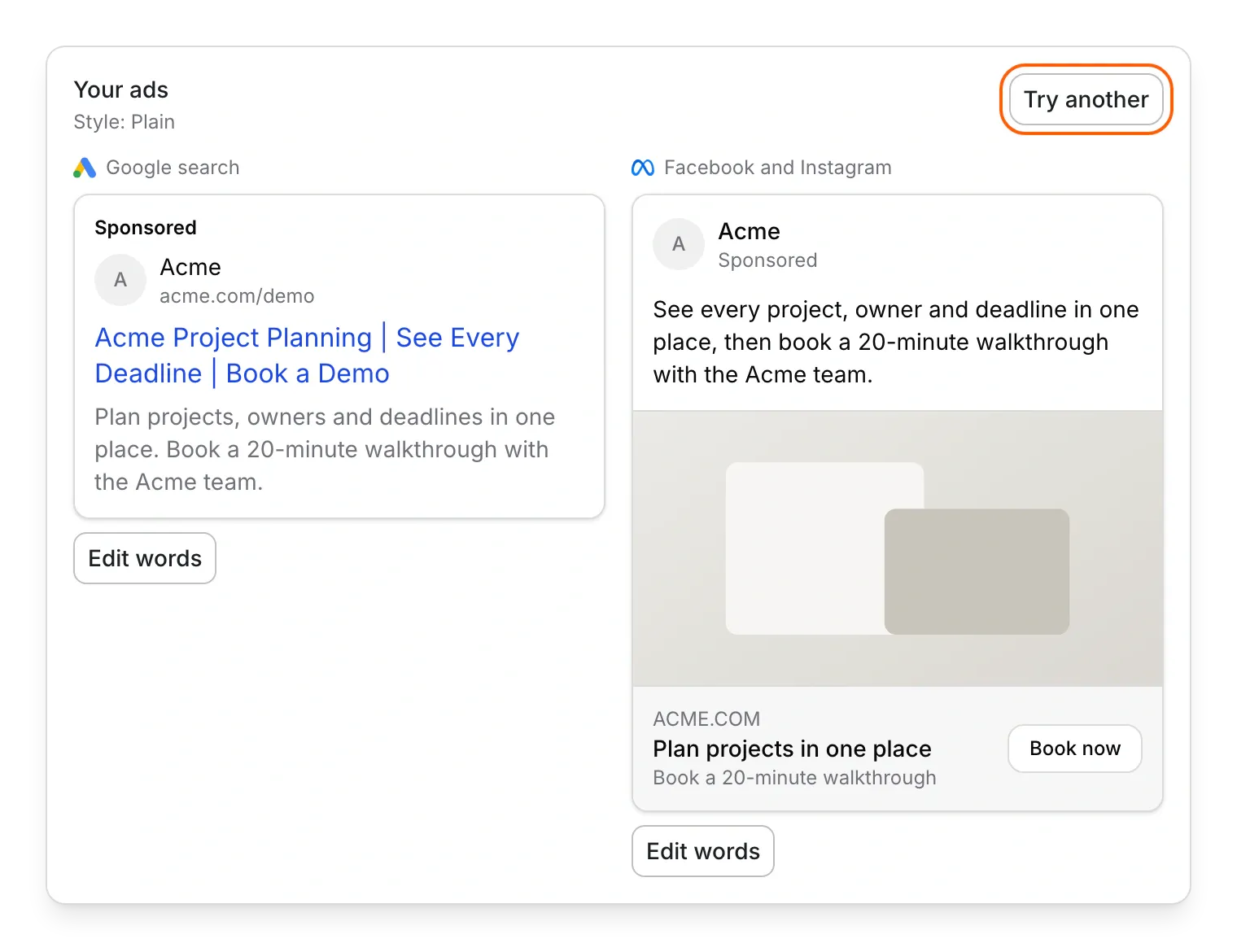
To decide later, click Save paused. Nothing spends until you start your ads.
Pause, resume or change the amount
- To stop every ad, click Pause all on the Overview, Ads or Budget tab.
- To start them again, click Resume on the Budget tab, check the amount and click Resume in the sheet.
- To pause one ad, open it on the Ads tab and click Pause.
- To spend more or less, click Change amount on the Budget tab, set the new amount and click Save.
See results and leads
The Overview tab shows this week's spend, your leads and what each one cost, plus the latest leads from ads. Each ad gets a verdict: too early, working, not working yet or check tracking.
Leads from ads also show in chatbot, under Inbox, with an Ad badge.
When Pixelesq pauses your ads
Pixelesq pauses your ads and emails every owner when:
- they reach your monthly amount. They start again on the 1st, unless you click Keep paused.
- your domain stops working, the page your ads link to goes down or is unpublished, or your Pixelesq billing has a problem.
- clicks stop showing up as visits on your site.
- someone changes the budget, or turns an ad back on, inside the ad platform.
On the Budget tab, under Safety pauses, you can turn off the checks for Lost domain, Billing, Landing page and Tracking.
Limits
- Campaigns is in beta, and only owners can use it.
- Your ad platform bills you directly. Pixelesq adds no fee.
- Pixel plans and writes your ads, and only an owner can start them or change the amount.
- Monthly amounts run from $150 to $15,000. Under $450 a month, Pixel uses one platform. LinkedIn needs at least $350 a month.
- Google runs search ads in English. Meta runs single-image ads on Facebook and Instagram. LinkedIn runs single-image posts from your Company Page that send people to your site.
- Ad accounts must bill in US, Canadian, Australian, New Zealand or Singapore dollars, euros or pounds.
- Pixelesq creates up to 5 new ads a day.
- LinkedIn is in beta: it works only with ad accounts we've approved, and lead reporting turns on once LinkedIn approves it.
- A lead isn't reported to the ad platform when the visitor declined cookies, didn't come from an ad click, or the submission was spam. Health care sites don't report leads at all.
Common questions
Why don't I see campaigns in the sidebar?
Only owners see it, and it's in beta. If you're an owner and it's missing, email hello@pixelesq.com for early access.
Who pays for the ads?
Your ad platform charges the card on your ad account. Pixelesq adds no fee on top.
Can editors start ads?
No. Editors can see the plan and click Ask with the owner's name to email them. Only the owner who connected an account can change it.
Why were my ads paused?
Pixelesq emails you the reason. Most often they reached your monthly amount, and they start again on the 1st.
What happens if I disconnect an account?
Pixelesq pauses the ads it created first. Campaigns you made in the ad platform itself keep running.
On this page
Prerequisites
Your site on your own domain, a page with a form, and a Google Ads, Meta or LinkedIn ad account with billing set up.
Still have questions?
Ask Pixel in your dashboard. It can make many changes for you, or take you to the right screen. Our team can also help you plan, build or move your site.


