HELP CENTER -> Lead capture
Create a form for your website from scratch or a template
Create a form
- In the sidebar, under manage, click forms.
- Click create.
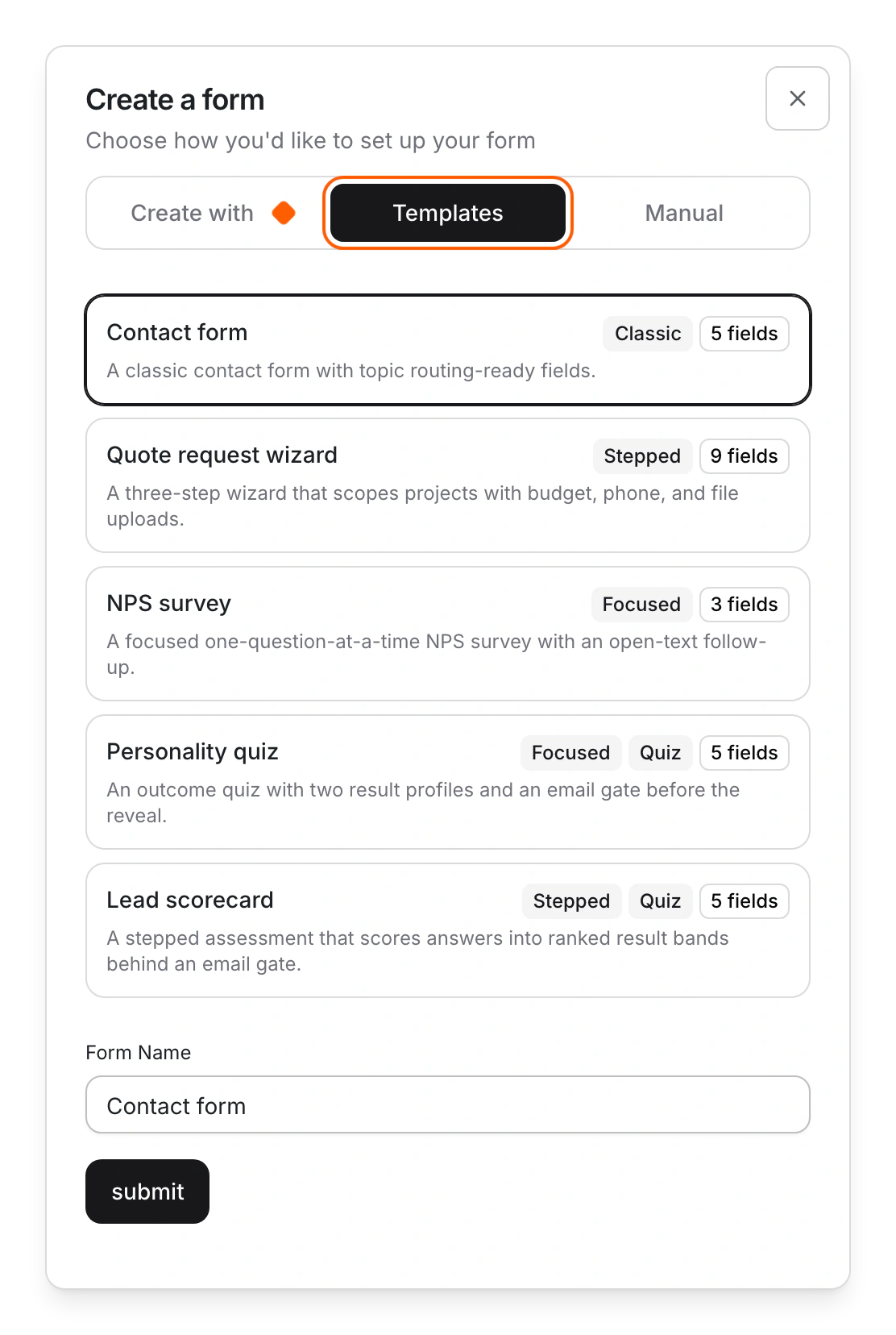
- Keep Manual and type a Form Name. Or open Templates and pick Contact form, Quote request wizard, NPS survey, Personality quiz or Lead scorecard.
- Click submit. The form editor opens for your fields.
Next steps
- Put the form on a page. See Add a form to a page.
- Get an email for each submission. See Get an email when someone submits a form.
Limits
- Forms have no draft. Saved changes are live at once on every page that shows the form.
- A new form isn't added to a page for you.
- Forms from a template send no emails until you set Mail To and Email Template.
- Every new project already has a Contact Form.
Common questions
What does "Name is required." mean?
Type a name for the form.
What if the templates don't load?
Click Retry.
Can AI build the form for me?
Yes. See Create a form with AI.
On this page
Create a formNext stepsLimitsCommon questions
Prerequisites
Still have questions?
Ask Pixel in your dashboard. It can make many changes for you, or take you to the right screen. Our team can also help you plan, build or move your site.


